Switching from Scrivener
A Scrivener alternative for writers whose world keeps getting bigger
Scrivener is one of the best manuscript tools ever made, and plenty of writers should keep using it. This page is for the ones who have hit a specific wall: the story has grown into a world, maybe into a series, and keeping track of it has turned into a second job.
Every fiction writer with a big cast has lived some version of that. In Scrivener the usual fix is a character sheet in the Research folder, keywords on scenes, maybe a spreadsheet on the side. It works, but you build and maintain all of it by hand, and none of it knows which scenes a character actually appears in.
Series make it harder. Each book is usually its own project, so the character sheets get copied forward, drift apart, and you end up searching three projects to find out what you already decided in book one.
What Scribere does differently
Your world is part of the manuscript
Characters, locations, artifacts, magic systems and glossary terms are their own entries, and you tag them to the scenes they appear in. Open a scene and you see who and what is in it. Story Hub's appearance grid shows which characters turn up in each chapter, so you can spot the one who vanished for ten chapters. Your world notes and your manuscript stay in one place instead of two.
One world across the whole series
World entries belong to the series, not to a single book. The innkeeper you introduced in book one is already there when she walks back in during book three, with everything you've written about her.
Write with your notes open
Split view puts your characters, locations and research next to the editor, so you can check your antagonist's eye color without losing your place.
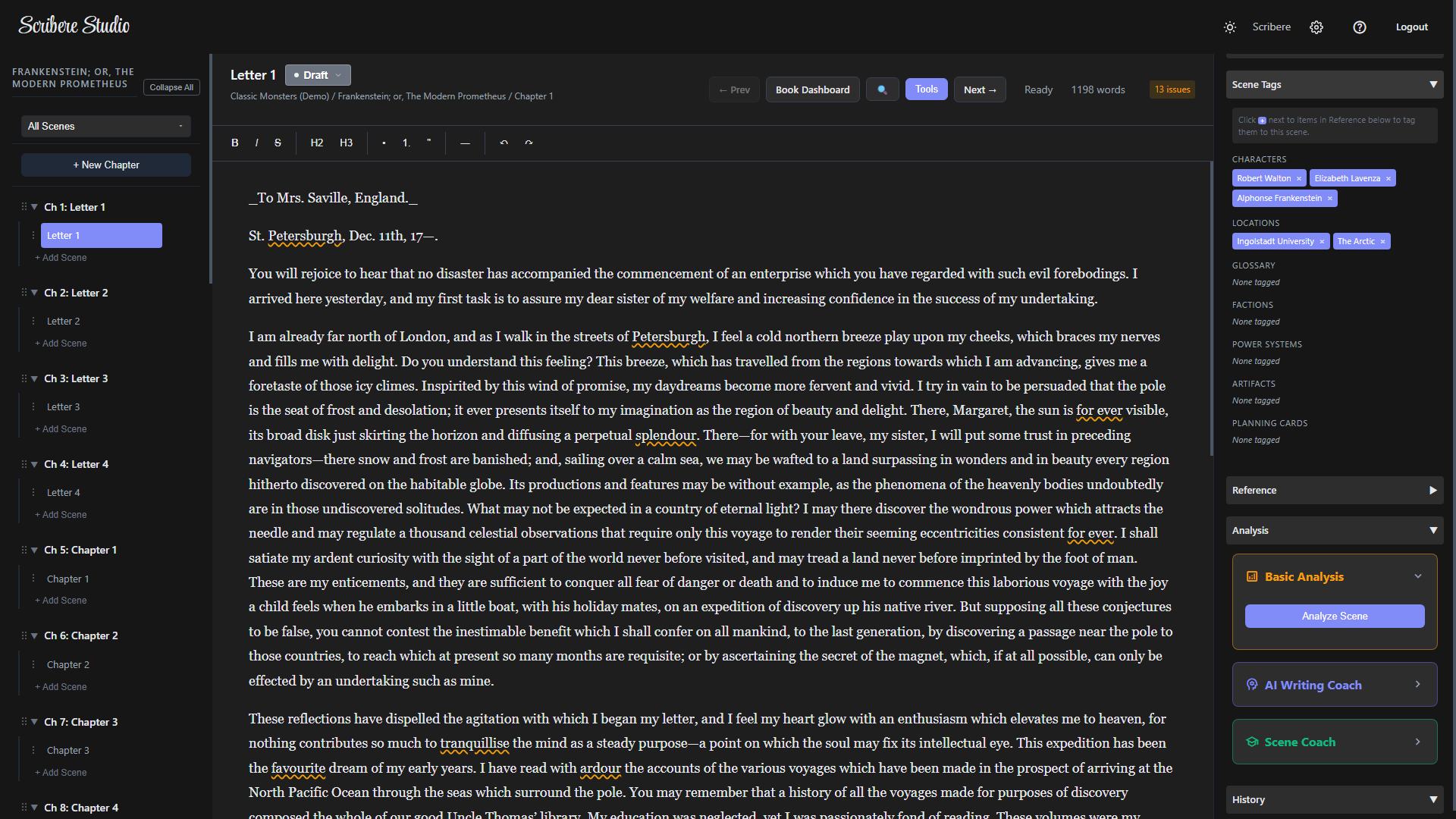
Any device, no sync to manage
Scribere runs in your browser. The same account works on Windows, Mac, Linux, a Chromebook, an iPad or your phone, with no license per platform and no Dropbox folder to keep in step. Scrivener has no Android or browser version, and on iOS it syncs through Dropbox.
Scribere and Scrivener side by side
| Scribere Studio | Scrivener 3 | |
|---|---|---|
| Price | Free during alpha. Then a free Basic plan, or Studio at $10 a month ($96 a year). Alpha testers get 50% off year one. | One-time purchase, about $60 per platform. Mac and Windows are separate licenses; iOS is sold separately. |
| Runs on | Any modern browser: Windows, Mac, Linux, Chromebook, iPad, phones | Mac, Windows, iPhone/iPad apps. No Android, no browser version. |
| Sync | Built in. Your work is the same everywhere you log in. | Your own files. iOS sync goes through Dropbox. |
| Worldbuilding | Characters, places, lore and glossary tagged to scenes, shared across a series | Research folder, keywords and document links you maintain yourself |
| Plotting | Corkboard linked to the manuscript. Move a card and the outline moves. | Corkboard and outliner, both excellent |
| Character tools | Enneagram-based builder for fears, desires and growth | Templates you fill in |
| Feedback on prose | 7 analyzers (pacing, readability, sentence variety, weak verbs) and an optional developmental editor, Lenore | Word counts, targets and text statistics |
| Beta readers | Invite readers, collect structured feedback in your dashboard | Export and send files |
| Export | DOCX, PDF and EPUB with title pages and chapter headings | Compile, which is far deeper and more configurable |
| Maturity | Alpha. You talk to the developer directly. | Around since 2007, with a huge community and tutorials |
Scrivener pricing and platform details as of October 2026; check Literature & Latte's store for current prices.
When you should stay with Scrivener
- You live in Compile. If you rely on Scrivener's compile formats for screenplays, academic work or finely tuned print layouts, Scribere's export won't replace that yet.
- You want your files on your own disk. Scrivener projects are folders you own and can back up any way you like, and they work with no internet connection at all.
- You'd rather pay once. Scrivener is a one-time purchase. Scribere is free now and will become a subscription.
- Your book doesn't have much of a world to track. For a tight literary novel with five characters, Scrivener's binder may be all you ever need.
Moving a Scrivener project into Scribere
- In Finder or File Explorer, compress your
.scrivproject folder into a ZIP file. Scribere accepts Scrivener 3 projects up to 50 MB. - Create a free Scribere account and choose New / Import Book, then Import Manuscript.
- Upload the ZIP. Scribere reads the project's structure directly, so chapters and scenes arrive in order with no pattern setup.
- Start tagging characters and places as you revise. Many writers rebuild their world entries during the first read-through, which doubles as a continuity pass.
During alpha the import brings in your manuscript (the Draft folder). Research files stay in Scrivener for now, so keep the original project.
"Scribere started because I couldn't find a single app that handled worldbuilding, manuscript editing, craft coaching, and export without needing four other tools and a spreadsheet. So I built one."
Rocky, creator of Scribere Studio
Questions writers ask
Is Scribere free?
Yes, during alpha, with no credit card. After that the Basic plan stays free, and Studio is $10 a month. Paid plans start no earlier than January 2027, and alpha testers get 50% off their first year. See pricing.
Does it use AI to write for me, or train on my writing?
No. AI is optional and every tool works without it. Lenore, the built-in editor, gives feedback on your scenes but never writes your words. Your manuscripts are stored on Scribere's own server and are never used to train AI.
How long does it take to get started?
A few minutes. Sign up, name your series and your first book, and start typing. You don't have to learn a system first: characters, places and the corkboard are there when you want them, and every new account has a demo series to look around in.
Can I try it without importing anything?
Yes. Every new account comes with a demo series you can poke at, so you can see how world entries and scenes connect before you bring your own book in.